Meeting Summaries
Last updated: August 28, 2026
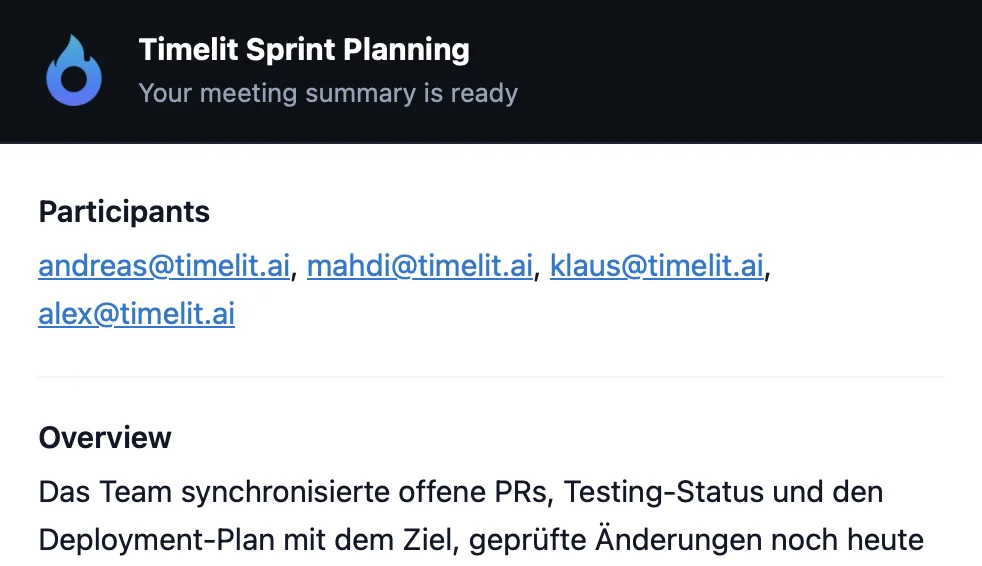
After every Teams meeting, you get a professional summary by email: what was discussed, what was decided, who has to do what. Optionally it goes to all participants, and the meeting is settled the moment it ends.
Why we built this
Meetings without minutes evaporate. Two weeks later nobody remembers what was decided, action items live in people's heads, and the next meeting starts with reconstructing the last one. Writing minutes manually fixes that, but it costs someone 20 minutes per meeting, so it rarely happens.
Teams already records a transcript of what everyone said. timelit turns that raw transcript into something people actually read: a structured summary with decisions and owners. And because summaries are also stored in your knowledge base, you can later ask in chat "what did we decide about the budget in March?" and get the answer.
How it works
1. Transcription starts. With auto-start enabled, timelit turns on transcription automatically for meetings in your calendar, so you don't have to remember anything. With auto-start off, you start it manually in the meeting (see below).
2. The meeting happens. Nothing for you to do.
3. timelit processes the transcript. As soon as the transcript is ready after the meeting ends, timelit reads it and writes a structured summary:
- Overview: what the meeting was about
- Key points & discussions: the substance, condensed
- Decisions: what was actually agreed
- Action items: who does what
- Risks & next steps
4. The summary arrives by email. By default it goes to you (the organizer receives it when it's your meeting). With automatic distribution enabled, all participants get it: minutes delivered before anyone has left the room, so to speak.
5. It becomes part of your knowledge. Every summary and transcript is searchable via Chat and Knowledge Search.
What timelit will never do
- Record secretly. Transcription in Teams is always visible to all participants; Teams itself announces it. timelit only uses what Teams transparently records.
- Send summaries to outsiders. Distribution goes to the meeting participants, nobody else.
- Summarize meetings without a transcript. No transcript, no summary. timelit doesn't guess.
Settings
| Setting | What it does |
|---|---|
| Meeting Summaries (main toggle) | Turns summaries on or off. |
| Automatically start transcription | timelit enables transcription for your meetings so you never forget to start it. |
| Automatic distribution | Sends the summary to all participants instead of just you. |
Good to know
- Auto-start off? Then start transcription manually in the meeting: More actions (…) → Start transcription. No transcription means no summary.
- When you first connect, timelit also imports your existing transcripts from the last ~6 months, so your meeting knowledge base isn't empty on day one.
- Already-processed meetings are never summarized twice, so no duplicate emails.
- Requires the Meetings connection, see Connecting Microsoft 365.