Smart Briefings
Last updated: August 28, 2026
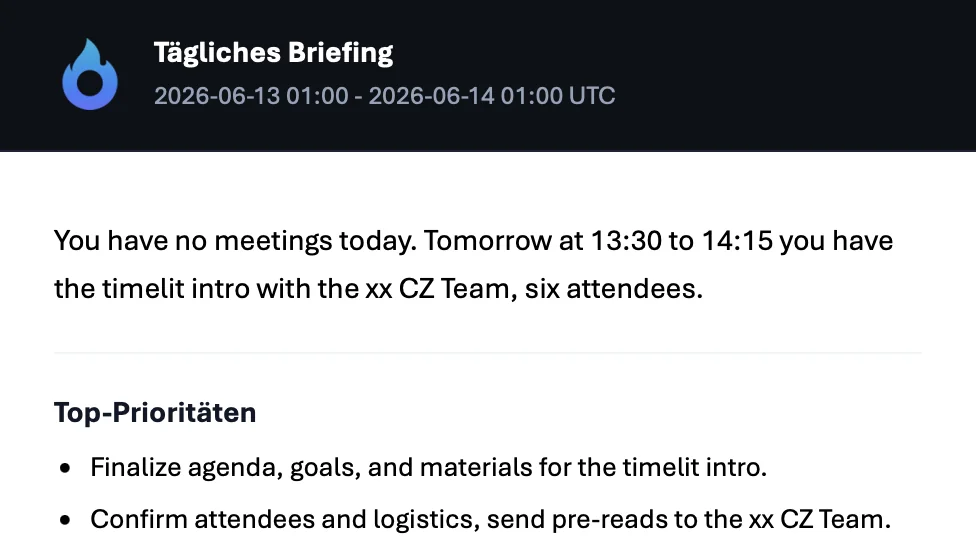
Every workday, before you start, one email: today's meetings, the important ones coming up, the emails waiting for your action, and your top priorities. Read it over coffee and you're prepared before you've opened a single app.
Why we built this
The first 30 minutes of most workdays are spent reconstructing context: scrolling the calendar, scanning the inbox, trying to remember what was urgent yesterday. It's the same routine every day, and it's automatable.
The briefing is deliberately an email, not a dashboard you have to remember to visit. It comes to you, it works on your phone in bed or on the train, and when you've read it, you're done. No app, no login, no new habit required.
How it works
Once a day, timelit looks at your calendar and mailbox and composes your briefing:
1. A short opening summary and your top priorities. timelit weighs everything below and answers the question "what actually matters today?" in a few lines.
2. Today's meetings. Your schedule for the day, with times in your timezone and direct links to each event.
3. Important upcoming meetings. A look ahead at the next days, but filtered: only meetings that stand out (marked high-importance, many attendees, or clearly significant topics like client or board meetings). Routine recurring meetings don't clutter your briefing.
4. Emails that need action. Your unread emails categorized as Action Required, with sender, subject, and direct link. Plus a count of unread mail per category, so you know what's piled up without opening it.
5. A closing quote. A small ritual to start the day. Sue us.
Everything in the briefing links straight to the source: one click opens the email or calendar event it refers to.
What timelit will never do
- Email anyone else. The briefing is for you only.
- Show you everything. The briefing is curated on purpose. It's a "what matters" email, not a data dump. The full picture is always in Outlook.
Settings
| Setting | What it does |
|---|---|
| Smart Briefings (main toggle) | Turns the daily briefing email on or off. |
That's it: one switch. The content composes itself from your actual calendar and inbox, and the briefing arrives in the language you set in your preferences.
Good to know
- The briefing gets better with the rest of timelit: categorization feeds the action-required list. The features compound.
- Requires the E-Mail and Calendar connections.
- Each briefing counts toward "Updates / Reports sent" on your Dashboard.